💥 Mini Tutorial To add the NO AI version of the DuckDuckGo search engine in Fir...
Eda @eda@framapiaf.org
💥 Mini Tutorial
To add the NO AI version of the DuckDuckGo search engine in Firefox
1. Go to Settings -> Search -> Additional search engines and hit Add search engine
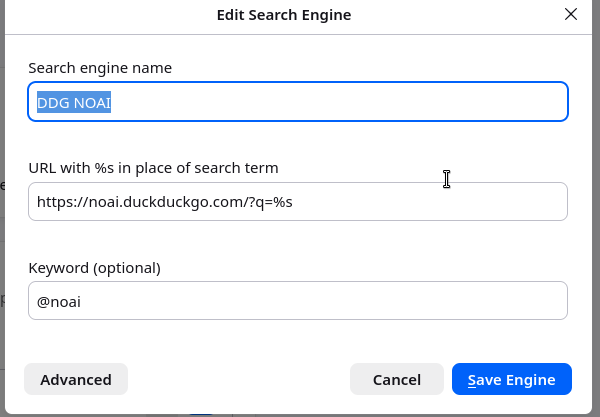
2. Pick a name for it and et add the URL https://
noai.duckduckgo.com/?q=%s (see screenshot).
3. Add it as the default search engine (the new chosen name appears in the list now)
By default the search engine Startpage has no AI.