haha holy shit so i use adguard to deal with browser ads on my macs lately i've ...
vga256 @vga256@tomodori.net
haha holy shit so i use adguard to deal with browser ads on my macs
lately i've been noticing my browsing speed has been noticeably hitchy, and it's even making my macOS UI sluggish. given that i'm running a 12-core xeon on my mac pro, i couldn't see how something as simple as a website could trash my performance
it's been bugging me for months, and i couldn't pin down the cause until today
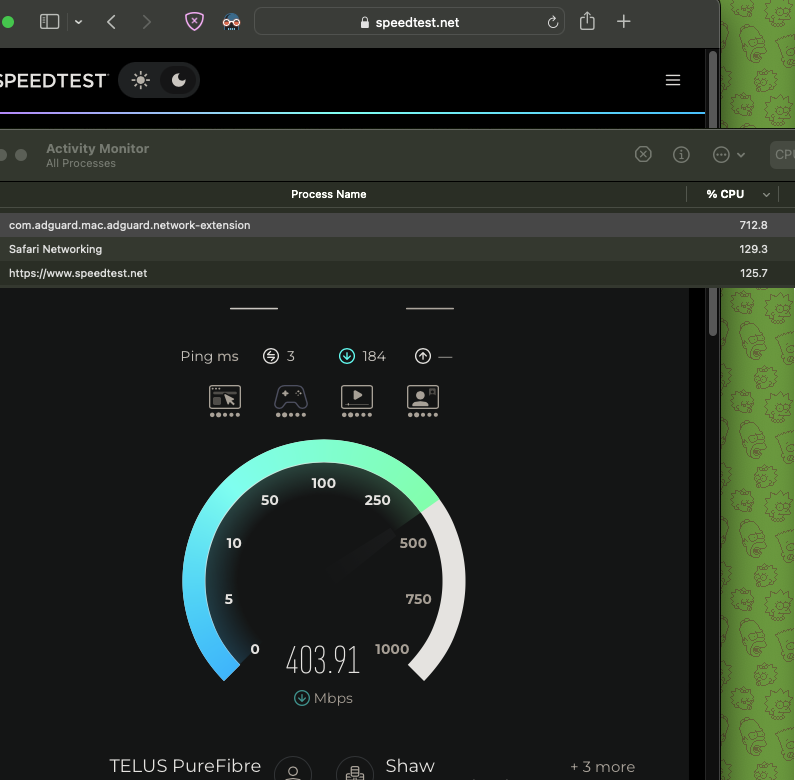
look at this speedtest.net benchmark: i'm getting 40% of my symmetrical gigabit fibre line. on a hunch, i turned off adguard, and suddenly it was back up to 950mbps
it didn't take long to find the culprit. look at that CPU utilization by com.adguard.mac.adguard.network-extension: it's eating 712% of CPU resources. that's about 7 single thread/cores running full-tilt.
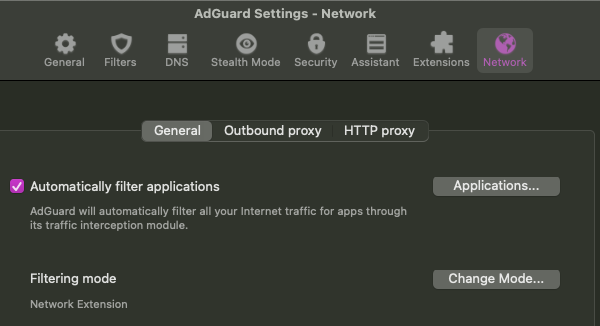
after experimenting in the adguard settings, i found the setting: [Network] -> Automatically Filter applications. some coder at adguard thought they'd out-apple apple, and write their own custom kernel extension to replace apple's networking extension. it's obviously badly optimized, and eats cpu cycles like candy. disabling network-level filtering or changing its filtering mode to proxying fixes this.
if you've got adguard installed on your mac, and it's running hot, or killing batteries, look no further.